The Ultimate Guide to Asynchronous Communication for Global Distributed Team
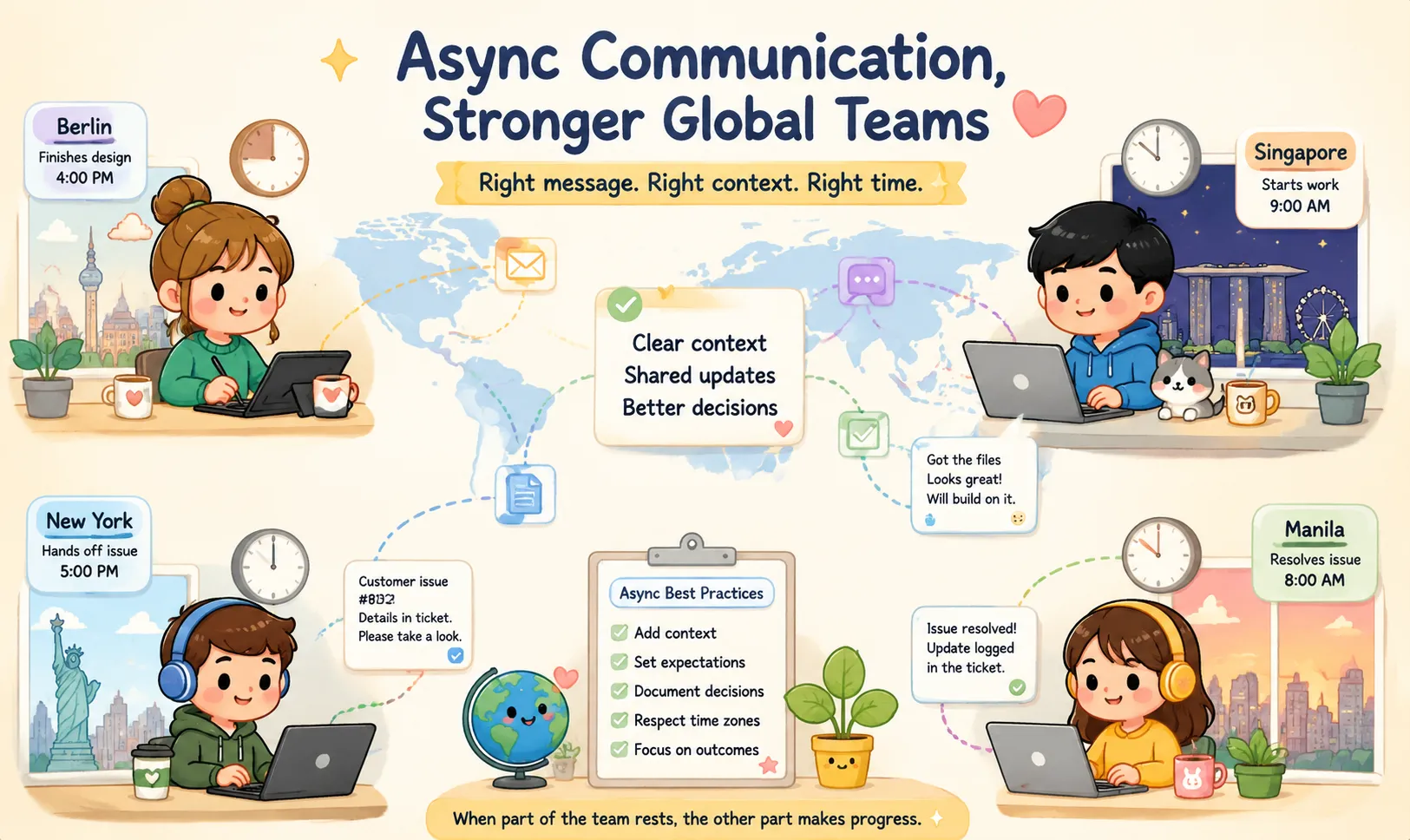
Distributed teams can now work across cities, countries, and continents without sharing the same office—or even the same working hours. A designer in Berlin may finish a prototype as a developer in Singapore begins the day. A support team in New York may hand an unresolved customer issue to colleagues in Manila. A product manager in London may review work completed overnight by engineers in California. This global model creates major opportunities, but it also introduces new communication problems: Feedback may take an entire working day. Short messages can lose their context. Time-zone differences can create late-night meetings. Cultural differences may affect how urgency or disagreement is interpreted. Important decisions may disappear inside busy chat channels. Employees may feel pressure to remain available at all hours. The solution is not to eliminate meetings or real-time communication completely. It is to make asynchronous communication the default and reserve synchronous communication for situations where it creates clear value. This guide explains how to design an async-first communication system that helps global teams make decisions, complete handoffs, and keep projects moving without requiring everyone to be online at the same time. Quick Answer An effective asynchronous team should: Write messages that contain enough context for the recipient to act independently. Define expected response times instead of expecting immediate replies. Record decisions in a searchable shared system. Use meetings for discussion, conflict resolution, and urgent blockers—not routine status updates. Establish limited overlap hours across time zones. Separate normal communication from emergency escalation. Use clear dates and time-zone formats. Protect sensitive files and configuration data before sharing them across tools. Async communication is successful when work continues even while part of the team is offline. What Is Asynchronous Communication? Asynchronous communication does not require the sender and recipient to respond at the same time. Examples include: Project briefs Task tickets Email Recorded video updates Code reviews Shared documents Decision logs Status reports Knowledge-base articles Comments inside design or project-management tools By contrast, synchronous communication happens in real time. Examples include: Video meetings Phone calls Live chat discussions Pair programming Workshops Incident-response calls Both models are useful. The goal is not to replace every conversation with documentation. The goal is to choose the communication method that matches the task. Synchronous vs. Asynchronous Communication Area Synchronous communication Asynchronous communication Typical channels Meetings, calls, live chat Documents, tickets, email, recorded updates Response expectation Immediate or near-immediate Within an agreed response window Best for Complex discussion, urgent incidents, conflict resolution Updates, reviews, handoffs, routine decisions Main advantage Fast interaction and clarification Flexibility across time zones Main limitation Interruptions and scheduling difficulty Delays when messages lack context Documentation Often requires additional notes Usually creates a written record Deep work Frequently interrupted Easier to protect Global accessibility Depends on shared working hours Works across different schedules The strongest distributed teams use both deliberately. 1. Make Asynchronous Communication the Default A common mistake is trying to reproduce an office environment online. Every question becomes a direct message. Every update becomes a meeting. Every delayed reply is treated as a problem. This approach creates constant interruptions and encourages employees to remain available outside their normal working hours. An async-first team starts with a different question: Can this issue be explained clearly enough for someone to respond later? Routine updates, review requests, project handoffs, and non-urgent questions should usually begin asynchronously. Synchronous communication should be used when it can shorten a difficult discussion, resolve uncertainty, or prevent a serious delay. Use asynchronous communication for: Daily and weekly updates Project requirements Design feedback Code reviews Research findings Routine approvals Progress reporting Non-urgent questions Meeting preparation Handoffs between regions Use synchronous communication for: Production incidents Complex brainstorming Sensitive performance discussions Conflict resolution High-risk decisions Workshops requiring rapid interaction Situations where written discussion is becoming inefficient A useful rule is: Start asynchronously. Move to a meeting only when written communication is no longer the fastest way forward. 2. Define Response-Time Expectations “Asynchronous” should not mean “reply whenever you remember.” Without clear expectations, team members may either wait too long or feel pressure to respond immediately. Define response windows for each communication channel. Communication type Example response expectation Routine project message Within one working day Review request Within 24–48 working hours Non-urgent email Within two working days Active blocker Within the next overlap window Production incident Immediate through the emergency channel Strategic document By the stated review deadline The exact times depend on the team, but the expectations should be visible and consistent. A message can also include its own urgency label: FYI: No response required Review requested: Reply by Thursday Decision needed: Choose an option by 15:00 UTC Blocker: Work cannot continue without an answer Urgent incident: Use the emergency process This prevents every message from appearing equally important. 3. Write Context-Rich Messages The greatest weakness of asynchronous communication is not delay. It is incomplete context. A vague question may create an unnecessary 24-hour cycle: The sender asks a short question. The recipient reads it many hours later. The recipient requests more details. The sender is now offline. Another working day is lost. Poor asynchronous message Hey Alex, the checkout API is broken. Can you look? This message does not explain: Which environment is affected What action caused the problem Whether the issue can be reproduced What error appeared How urgent it is What the recipient is expected to do Better asynchronous message Issue: Payment request returns HTTP 500 in the staging environment. Steps to reproduce: Add product SKU-402 to the cart. Select the test credit-card method. Click “Pay Now.” Observed result: The checkout page displays a generic error. The attached response contains error code AUTH_KEY_EXPIRED. Expected result: The payment should be authorized and the confirmation page should open. What I checked: The front-end request format matches the current API documentation. The issue began after yesterday’s sandbox deployment. Action needed: Please confirm whether the sandbox credential expired or changed. Priority: Medium. This does not block today’s release, but we need an answer before Friday at 12:00 UTC. The recipient can begin investigating immediately without asking several follow-up questions. A Simple Context-Rich Messaging Framework Use this structure for requests, bugs, reviews, and handoffs: 1. Background What is happening, and why does it matter? 2. Current status What has already been completed? 3. Evidence Include relevant screenshots, links, files, logs, or examples. 4. Action required State exactly what the recipient needs to do. 5. Deadline Give a clear date and time when necessary. 6. Priority and impact Explain whether the task is informational, important, blocking, or urgent. A useful short template is: Context:Current status:What I checked:Action needed:Deadline:Impact if delayed: 4. Design Better Cross-Time-Zone Handoffs A distributed team can operate almost continuously when handoffs are clear. Poor handoffs create confusion. Good handoffs allow one region to continue work while another sleeps. Example handoff Completed today Added the new checkout API endpoint. Updated the staging environment. Verified successful payments using Visa test cards. Still in progress PayPal test payments return a callback error. Blocker We need the latest callback URL configuration from the infrastructure team. Next owner Singapore engineering team. Recommended next step Compare the current staging callback URL with the value in the deployment configuration. Relevant links Ticket Pull request Test logs Deployment notes The next team should not need to reconstruct the entire history before continuing. The Minimum Information in Every Handoff A handoff should answer five questions: What was completed? What remains unfinished? What is currently blocked? Who owns the next action? Where is the supporting information? When any of these answers is missing, work may stop until the original sender returns. 5. Create a Single Source of Truth Chat applications are useful for conversation, but they are poor long-term knowledge systems. Important decisions can become buried beneath hundreds of messages. New team members may not know where to find the latest version of a requirement. A distributed team should define where different information belongs. Information Recommended location Final project requirements Project document or knowledge base Actionable work Task-management system Code changes Repository and pull request Design feedback Design-review tool Important decisions Decision log Urgent incident discussion Incident-management channel Temporary conversation Team chat Reusable process Internal documentation The final answer to an important question should not exist only inside a private direct-message thread. After a chat discussion or meeting, record the outcome in the system where the team expects to find it later. Use Decision Logs A short decision log prevents teams from reopening the same debate repeatedly. Each entry can include: Decision Date Decision owner Context Options considered Reason for the choice Expected consequences Review date, when applicable Example Decision: Use WebP as the default format for new blog images.Date: July 31, 2026Owner: Content platform teamReason: It provides smaller files while maintaining acceptable quality in current browser environments.Exception: PNG remains available for graphics requiring lossless transparency.Review: Reassess after the next image pipeline upgrade. This creates clarity even for team members who were not present during the original discussion. 6. Protect Deep Work Constant availability is one of the largest productivity risks in distributed teams. When every notification can interrupt work, team members spend more time switching context than solving problems. Async-first teams should protect blocks of uninterrupted work. Useful practices include: Turning off non-essential notifications Checking communication at planned intervals Using status indicators to show focus time Avoiding direct messages for routine project work Adding response deadlines instead of requesting immediate replies Scheduling meeting-free periods Grouping reviews and approvals into batches An async system should reduce interruptions—not simply move them into another application. 7. Establish Golden Overlap Hours Many global teams have a small period when working hours naturally overlap. For example, a London-based employee and a Singapore-based employee may share a limited window during the European morning and Asian afternoon. These overlap hours are valuable and should not be filled automatically with routine meetings. Use overlap time for: Resolving blockers Complex technical discussion High-risk decisions One-to-one conversations Sensitive feedback Incident handoffs Relationship building Do not use overlap time for: Reading status updates aloud Reviewing information already available in a document Meetings without an agenda Discussions that only involve two of ten attendees Routine announcements When overlap is extremely limited, rotate inconvenient meeting times so that the same region does not always carry the burden. 8. Use Clear Time-Zone Formats Time-zone abbreviations are often ambiguous. For example, CST may refer to different regions. EST can also be inaccurate during daylight-saving periods. Use one of these approaches: UTC Review deadline: August 5 at 15:00 UTC. UTC plus relevant local time Meeting: August 5 at 15:00 UTC / 23:00 Singapore time. Named regional time zone Deadline: August 5 at 10:00 in America/New_York. For international teams, every invitation or deadline should include: The date The time The time zone Whether the time changes with daylight saving A calendar invitation when appropriate Avoid phrases such as: Tomorrow morning End of day Before lunch Later tonight Next Friday These expressions depend on the reader’s location and time of reading. Use a full date instead: Please respond by Friday, August 7, at 16:00 UTC. 9. Separate Urgent Work from Normal Communication Team chat should not be the only emergency system. Messages can be muted, missed, or read too late. A production outage requires a different process from a routine project question. Create an escalation matrix. Severity Example Communication method Low Minor visual issue Task ticket Medium Important feature blocked Project channel and owner mention High Customer-facing service degradation Incident channel and on-call notification Critical Security event or major outage Dedicated alerting and incident-response process The team should know: What qualifies as an incident Who is currently on call How to contact the on-call person When to escalate Who leads the response Where updates are recorded How the incident is handed to the next region Do not label every issue urgent. When everything is urgent, the label becomes meaningless. 10. Make Meetings Async-Friendly Some meetings will still be necessary, but they should produce value for people who cannot attend. Before the meeting: Share an agenda. Explain the decision or outcome required. Link relevant documents. Ask participants to comment in advance. Confirm who genuinely needs to attend. During the meeting: Assign a facilitator. Keep the discussion focused. Record key decisions and action items. Avoid relying only on the video recording. After the meeting: Publish a short written summary. List decisions. Assign action owners. Include deadlines. Update the relevant project document. A two-line message saying “We discussed this in the meeting” is not useful to colleagues who were asleep. 11. Reduce Cultural Misunderstandings Cross-border communication is not only a time-zone problem. It is also a cultural and language-design problem. Communication styles vary across countries and organizations. A message intended to be efficient may appear rude. A polite response may be mistaken for agreement. An indirect concern may be interpreted as approval. Write for clarity Avoid: Sarcasm Culture-specific jokes Unexplained abbreviations Idioms Ambiguous urgency Very long unstructured paragraphs Excessively indirect requests Instead of: It would be great if someone could possibly take a look when they get a chance. Write: Maya, please review sections 2 and 3 by Thursday at 12:00 UTC. Let me know if the deadline is not realistic. Clear communication is not impolite. It reduces the chance of misunderstanding. Confirm decisions explicitly After a complicated discussion, summarize: To confirm, we agreed to launch the German version first. The French version will move to the next release. Daniel owns the translation update, due August 10. This gives everyone an opportunity to correct the record. 12. Choose Tools According to Their Purpose A successful global team usually needs several categories of tools. Documentation and knowledge Used for long-term project information, processes, research, and decisions. Examples may include: Notion Confluence Slite GitHub Discussions Internal documentation systems Task and project management Used to define ownership, deadlines, dependencies, and progress. Examples may include: Linear Jira Asana Trello ClickUp Recorded updates Useful for design walkthroughs, demonstrations, and explanations that are difficult to communicate through text alone. Examples may include: Loom Tella Recorded screen-sharing tools A recorded video should normally include a brief written summary so recipients can understand the topic before watching it. Time-zone planning Used to compare working hours and schedule overlap. Examples may include: World Time Buddy Calendar time-zone features Team availability dashboards Incident response Used for production alerts, on-call scheduling, escalation, and incident coordination. Examples may include: PagerDuty Opsgenie Dedicated monitoring and alerting platforms File and data utilities Teams frequently need to: Format JSON Compare text Compress an image Convert a file Generate a checksum Decode Base64 Validate a Cron expression Prepare a smaller document for sharing ToolOnline.ink provides browser-based utilities for common file, image, code, and data tasks. For tools explicitly described as client-side, supported processing is intended to occur in the browser. Before entering sensitive company data, always review the privacy explanation for the individual tool. Do not paste real passwords, private keys, access tokens, or production credentials into a general-purpose utility. 13. Protect Sensitive Information Across Borders Global teams often share information across countries, cloud platforms, and third-party services. This does not mean that using a cloud tool automatically violates privacy regulations. The risk depends on factors such as: The type of data The countries involved The service provider Contractual protections Data-retention policies Security controls The organization’s legal obligations Whether personal information is involved Teams should follow their organization’s approved data-handling policy. Avoid sharing unnecessary sensitive data Before sending a file or message, remove information that the recipient does not need. Examples include: API keys Passwords Access tokens Customer identifiers Personal addresses Payment information Internal network details Unrelated portions of contracts Location metadata in images Use placeholders in technical examples Instead of: api_key: sk_live_real_secret Use: api_key: EXAMPLE_API_KEY Instead of sharing a full production payload, create a reduced test example that reproduces the problem without exposing customer data. Check file metadata Documents and images may contain: Author names Revision history GPS coordinates Device information Comments Hidden sheets Tracked changes Review metadata before distributing sensitive files externally. 14. Create an Async Status-Update Template Status updates should be easy to scan. A practical structure is: Progress Completed the checkout-page design. Added mobile responsive states. Next Create the error-state prototype. Send the final design for review. Blockers Waiting for the updated payment error messages. Help needed Product team to confirm the retry-button behavior. Deadline Final prototype due August 6 at 12:00 UTC. This is more useful than: Still working on checkout. Almost done. 15. Create an Async Review Request Template A review request should tell the reviewer what kind of feedback is needed. What is being reviewed:New mobile checkout flow. Current stage:High-fidelity prototype before development. Please focus on: Whether the payment steps are understandable. Whether the error messages provide clear next actions. Whether any required legal information is missing. Do not review yet:Final colors and illustrations. Links:Prototype and requirements document. Response deadline:August 4 at 16:00 UTC. Decision after review:Approve for development or request one additional design round. The reviewer now knows what to inspect and what not to spend time on. Common Async Communication Mistakes Sending “Hello” and waiting A message such as: Hi, are you there? requires the recipient to respond before learning what is needed. Send the complete request in the first message. Using chat as permanent documentation Chat is useful for fast discussion, but final decisions should be recorded in a stable location. Expecting instant replies If a response is genuinely urgent, use the emergency process. Otherwise, respect the agreed response window. Writing long messages without structure Use headings, short paragraphs, links, and clear action items. Recording videos without summaries A 15-minute video can be difficult to search and review. Include a written outline and required action. Inviting everyone to every meeting Attendance should be based on contribution or decision responsibility, not visibility. Failing to assign ownership “Someone should update this” is not an action item. Use: Priya will update the customer FAQ by August 5 at 12:00 UTC. Hiding important work in private messages When the answer affects the project, move it into the shared project system. Frequently Asked Questions Does asynchronous communication eliminate meetings? No. Meetings remain useful for complex discussions, relationship building, conflict resolution, workshops, and emergencies. Async-first means that meetings are used intentionally rather than automatically. How quickly should team members respond? Response time depends on the type of work. Many teams use one working day for routine communication, but urgent blockers require a faster process. Publish the expected response time for each channel. How do you handle a production emergency? Use a dedicated incident-response process with on-call ownership, automated alerts, escalation rules, and a shared incident channel. Do not rely only on ordinary email or chat messages. How can managers know whether remote employees are working? Measure outcomes, ownership, quality, and progress—not online status. Useful signals include: Completed deliverables Updated project records Clear handoffs Reliable deadlines Quality of decisions Early communication about blockers A green status indicator is not proof of productivity. How can teams build culture asynchronously? Culture can develop through: Recognition posts Personal introductions Written team traditions Optional social channels Recorded demonstrations Mentoring Thoughtful onboarding Occasional live social events In-person gatherings when practical Culture requires intentional interaction, but it does not require constant meetings. Should every update be written? Not necessarily. Complex visual explanations may be easier through a short recorded demonstration. Sensitive conversations may be better live. Use the format that communicates the information most effectively, then preserve the important outcome in writing. How do you prevent documentation from becoming outdated? Assign document owners and review dates. Archive outdated pages instead of leaving several conflicting versions visible. Link tasks and decisions to the current source of truth. How should deadlines be written across time zones? Use a full date, time, and time zone. For example: August 7, 2026, at 15:00 UTC. Avoid ambiguous phrases such as “tomorrow afternoon” or “end of day.” Async Communication Checklist Before sending a message, confirm: The recipient understands the background. The required action is explicit. Relevant evidence or links are included. The deadline is clear. The time zone is stated. The urgency level is accurate. Sensitive information has been removed. The message is posted in the correct shared channel. The recipient can proceed without waiting for clarification. Before scheduling a meeting, confirm: Written discussion is no longer sufficient. The meeting has a defined outcome. Only necessary participants are invited. The inconvenience is distributed fairly across regions. An agenda is available. The result will be documented. Conclusion Successful cross-border communication does not require employees to remain online around the clock. It requires a system in which information is clear, decisions are recorded, ownership is visible, and work can continue while colleagues in another region are offline. An effective async-first team: Writes context-rich messages. Defines response-time expectations. Creates reliable regional handoffs. Protects overlap hours for important discussions. Separates normal work from emergency escalation. Records decisions in a shared source of truth. Uses clear dates and time zones. Protects sensitive information before sharing it. Chooses synchronous communication only when it adds real value. Tools can support this system, but they cannot replace clear communication habits. ToolOnline.ink can help teams prepare files, images, code, and structured data for sharing through browser-based utilities. However, every organization should still follow its own privacy, security, and compliance requirements. The goal of asynchronous communication is not slower conversation. It is uninterrupted progress without requiring everyone to be awake at the same time.

WhatsApp Messenger


CallApp: Caller ID & Block


Caller ID Trusted Call & Block


Yahoo Mail: Email & Planner
 4
4